Ruby on Rails Tutorial Note
Introduction
1.
建立靜態頁面
1.1.
建立一個 APP
1.2.
建立 StaticPages controller
1.3.
第一個測試
1.4.
動態頁面
1.5.
練習題
1.6.
進階測試設定
2.
Rails-flavored Ruby
2.1.
Strings and methods
2.2.
Other data structures
2.3.
Ruby classes
2.4.
Conclusion
2.5.
Exercises
3.
Filling in the layout
3.1.
Adding some structure
3.1.1.
Site navigation
3.1.2.
Bootstrap and custom CSS
3.1.3.
Partials
3.2.
Sass and the asset pipeline
3.2.1.
The asset pipeline
3.2.2.
Syntactically awesome stylesheets
3.3.
Layout links
3.3.1.
Contact page
3.3.2.
Rails routes
3.3.3.
Using named routes
3.3.4.
Layout link tests
3.4.
User signup: A first step
3.4.1.
Users controller
3.5.
Conclusion
3.6.
Exercises
4.
Modeling users
4.1.
User model
4.1.1.
Database migrations
4.1.2.
The model file
4.1.2.1.
Creating user objects
4.1.2.2.
Finding user objects
4.1.2.3.
Updating user objects
4.2.
User validations
4.2.1.
A validity test
4.2.2.
Validating presence
4.2.3.
Length validation
4.2.4.
Format validation
4.2.5.
Uniqueness validation
4.3.
Adding a secure password
4.3.1.
A hashed password
4.3.2.
User has secure password
4.3.3.
Minimum password standards
4.3.4.
Creating and authenticating a user
4.4.
Conclusion
4.5.
Exercises
5.
Sign up
5.1.
Showing users
5.1.1.
Debug and Rails environments
5.1.2.
A Users resource
5.1.3.
Debugger
5.1.4.
A Gravatar image and a sidebar
5.2.
Signup form
5.2.1.
Using form_for
5.2.2.
Signup form HTML
5.3.
Unsuccessful signups
5.3.1.
A working form
5.3.2.
Strong parameters
5.3.3.
Signup error messages
5.3.4.
A test for invalid submission
5.4.
Successful signups
5.4.1.
The finished signup form
5.4.2.
The flash
5.4.3.
The first signup
5.4.4.
A test for valid submission
5.5.
Professional-grade deployment
5.5.1.
SSL in production
5.5.2.
Production webserver
5.5.3.
Ruby version number
5.6.
Conclusion
5.7.
Exercises
6.
Log in, log out
6.1.
Sessions
6.1.1.
Sessions controller
6.1.2.
Login form
6.1.3.
Finding and authenticating a user
6.1.4.
Rendering with a flash message
6.1.5.
A flash test
6.2.
Logging in
6.2.1.
The log_in method
6.2.2.
Current user
6.2.3.
Changing the layout links
6.2.4.
Testing layout changes
6.2.5.
Login upon signup
6.3.
Logging out
6.4.
Remember me
6.4.1.
Remember token and digest
6.4.2.
Login with remembering
6.4.3.
Forgetting users
6.4.4.
Two subtle bugs
6.4.5.
“Remember me” checkbox
6.4.6.
Remember tests
6.5.
Conclusion
6.6.
Exercises
7.
Updating, showing, and deleting users
7.1.
Updating users
7.1.1.
Edit form
7.1.2.
Unsuccessful edits
7.1.3.
Testing unsuccessful edits
7.1.4.
Successful edits (with TDD)
7.2.
Authorization
7.2.1.
Requiring logged-in users
7.2.2.
Requiring the right user
7.2.3.
Friendly forwarding
7.3.
Showing all users
7.3.1.
Users index
7.3.2.
Sample users
7.3.3.
Pagination
7.3.4.
Users index test
7.3.5.
Partial refactoring
7.4.
Deleting users
7.4.1.
Administrative users
7.4.2.
The destroy action
7.4.3.
User destroy tests
7.5.
Conclusion
7.6.
Exercises
8.
Account activation and password reset
8.1.
Account activation
8.1.1.
Account activations resource
8.1.2.
Account activation mailer method
8.1.3.
Activating the account
8.1.4.
Activation test and refactoring
8.2.
Password reset
8.2.1.
Password resets resource
8.2.2.
Password resets controller and form
8.2.3.
Password reset mailer method
8.2.4.
Resetting the password
8.2.5.
Password reset test
8.3.
Email in production
8.4.
Conclusion
8.5.
Exercises
8.6.
Proof of expiration comparison
9.
User microposts
9.1.
A Micropost model
9.1.1.
The basic model
9.1.2.
Micropost validations
9.1.3.
User/Micropost associations
9.1.4.
Micropost refinements
9.2.
Showing microposts
9.2.1.
Rendering microposts
9.2.2.
Sample microposts
9.2.3.
Profile micropost tests
9.3.
Manipulating microposts
9.3.1.
Micropost access control
9.3.2.
Creating microposts
9.3.3.
A proto-feed
9.3.4.
Destroying microposts
9.3.5.
Micropost tests
9.4.
Micropost images
9.4.1.
Basic image upload
9.4.2.
Image validation
9.4.3.
Image resizing
9.4.4.
Image upload in production
9.5.
Conclusion
9.6.
Exercises
10.
Following users
10.1.
The Relationship model
10.1.1.
A problem with the data model (and a solution)
10.1.2.
User/relationship associations
10.1.3.
Relationship validations
10.1.4.
Followed users
10.1.5.
Followers
10.2.
A web interface for following users
10.2.1.
Sample following data
10.2.2.
Stats and a follow form
10.2.3.
Following and followers pages
10.2.4.
A working follow button the standard way
10.2.5.
A working follow button with Ajax
10.2.6.
Following tests
10.3.
The status feed
10.3.1.
Motivation and strategy
10.3.2.
A first feed implementation
10.3.3.
Subselects
10.4.
Conclusion
10.5.
Exercises
11.
相關指令
Powered by
GitBook
Ruby on Rails Tutorial Note
Deleting users
接下來要建立最後一個 REST action:
destroy
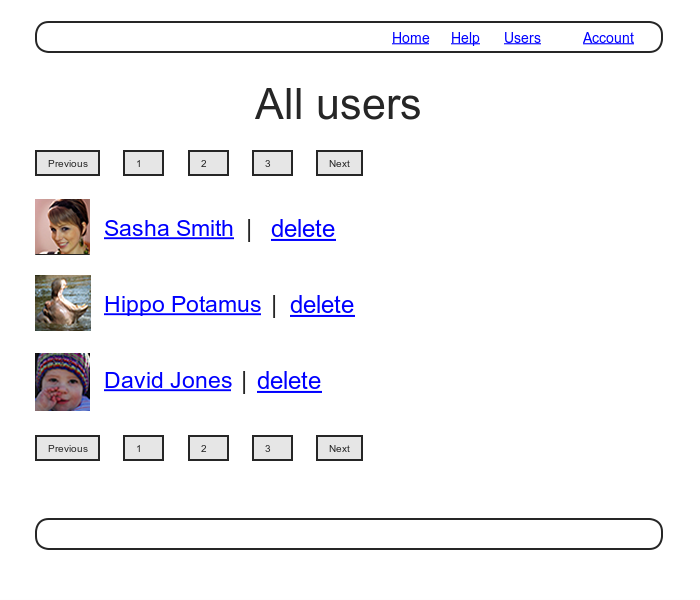
,但我們必須先建立有權限的管理員(admins),管理員才能執行刪除使用者的動作,架構如下: