The basic model
Micropost model 只需要兩個屬性,一個是 content 屬性,用來儲存 micropost 的內容,另一個是 user_id,用來聯繫 micropost 和使用者的關聯。
資料模型如下:
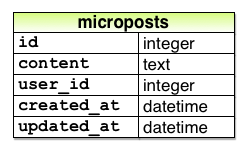
注意,content 屬性使用的類型是 text,作用是可以儲存任意長度的文字。雖然之後會限制 micropost 內容長度不超過 140 個字元,也就是說會在 string 類型的 255 個字元長度限制內,但使用 text 更能表達 micropost 的特性,把 micropost 看成一段文字會更合理。之後會使用 text area 代替 text field,用來提交 micropost。而且,如果以後想讓內容變長(例如包含多國語言文字),使用 text 會更有彈性。最後,在 production 環境中使用 text 不會有性能差異(no performance difference),所以不會有額外消耗。
現在就來建立 Micropost model:
$ rails generate model Micropost content:text user:references
這個指令會產生一個遷移,用來建立資料庫裡的 microposts table,把它跟 users table 比較的話,最大差異在於 microposts table 使用了 references 類型,references 會自動增加一個 user_id 欄位(以及索引和 參考用的 foreign key),把使用者和 micropost 關聯起來。
foreign key reference 是屬於資料庫層級的限制(database-level constraint),作用在於指出 microposts table 的
user_id會參考至 users table 的id欄位。這部分的細節不會在此教學中深入,而 foreign key constraint 也不是所有資料庫都支援,它被 PostgreSQL 支援,也就是在 production 環境中,而在 development 環境中的 SQLite 則不支援。
就像 User model 一樣,Micropost model 的遷移也包含 t.timestamps ,這行程式碼的作用是會增加兩個欄位:created_at、updated_at。
Micropost model 的遷移:
db/migrate/[timestamp]_create_microposts.rb
class CreateMicroposts < ActiveRecord::Migration
  def change
    create_table :microposts do |t|
      t.text :content
      t.references :user, index: true, foreign_key: true

      t.timestamps null: false
    end
    add_index :microposts, [:user_id, :created_at]
  end
end
因為我們會按照發佈時間的倒序來查詢某位使用者發布的所有 microposts,所以上述程式碼為 user_id 和 created_at 欄位增加了索引:
add_index :microposts, [:user_id, :created_at]
我們把 user_id 和 created_at 放在一個陣列裡,告訴 Rails 我們要建立的是 multiple key index,因此 Active Record 會同時使用這兩個 keys。
然後執行遷移:
$ bundle exec rake db:migrate