Edit form
首先,我們要先建立編輯表單,架構如下:
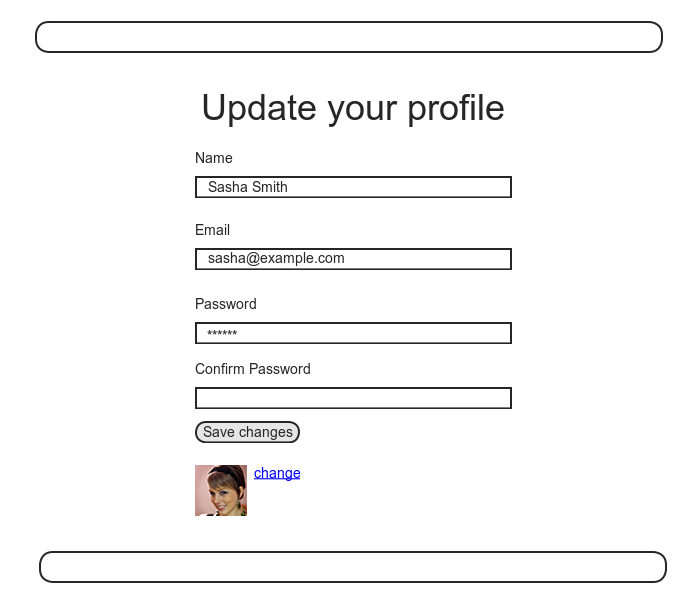
為了實現上述架構,我們要完成 Users controller 的 edit action 和對應的 view。
在 edit action 中,我們要把相關的使用者從資料庫中取出來。查詢 rake routes 可以知道,使用者編輯頁面的 URL 會是 users/1/edit (假設使用者 id 為 1)。我們知道使用者的 id 可以透過 params[:id] 取得,所以可以透過以下程式碼取得想要的使用者:
app/controllers/users_controller.rb
class UsersController < ApplicationController

  def show
    @user = User.find(params[:id])
  end

  def new
    @user = User.new
  end

  def create
    @user = User.new(user_params)
    if @user.save
      log_in @user
      flash[:success] = "Welcome to the Sample App!"
      redirect_to @user
    else
      render 'new'
    end
  end

  def edit
    @user = User.find(params[:id])
  end

  private

    def user_params
      params.require(:user).permit(:name, :email, :password,
                                   :password_confirmation)
    end
end
然後建立一個 app/views/users/edit.html.erb view :
<% provide(:title, "Edit user") %>
<h1>Update your profile</h1>

<div class="row">
  <div class="col-md-6 col-md-offset-3">
    <%= form_for(@user) do |f| %>
      <%= render 'shared/error_messages' %>

      <%= f.label :name %>
      <%= f.text_field :name, class: 'form-control' %>

      <%= f.label :email %>
      <%= f.email_field :email, class: 'form-control' %>

      <%= f.label :password %>
      <%= f.password_field :password, class: 'form-control' %>

      <%= f.label :password_confirmation, "Confirmation" %>
      <%= f.password_field :password_confirmation, class: 'form-control' %>

      <%= f.submit "Save changes", class: "btn btn-primary" %>
    <% end %>

    <div class="gravatar_edit">
      <%= gravatar_for @user %>
      <a href="http://gravatar.com/emails" target="_blank">change</a>
    </div>
  </div>
</div>
你會發現編輯頁面的架構其實和註冊頁面長得差不多,所以其實可以重構,使用 partial 來取代重複的程式碼,這個留在練習題實作。
上述程式碼重複使用了 error_messages partial。然後在 Gravatar 連結中使用 target="_blank",目的是要新開視窗或頁籤。
畫面會長這樣:
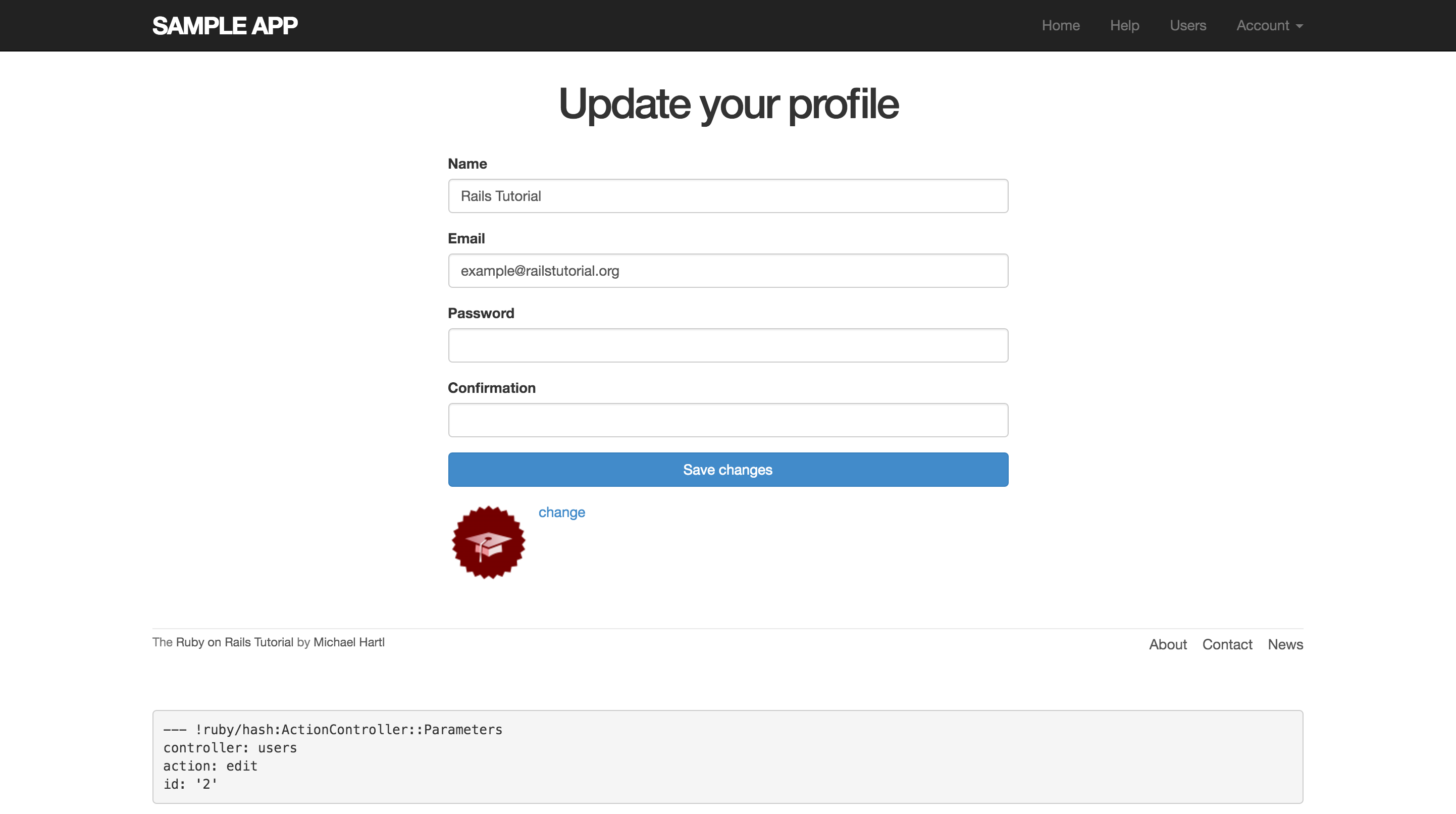
其中 name 和 email 的部分都被預先填上既存的資料,這是因為我們使用了 @user 取得既存使用者。
查看 HTML 原始碼,我們會看到預期的表單架構:
<form accept-charset="UTF-8" action="/users/1" class="edit_user"
      id="edit_user_1" method="post">
  <input name="_method" type="hidden" value="patch" />
  .
  .
  .
</form>
其中這段:
<input name="_method" type="hidden" value="patch" />
因為瀏覽器無法處理 PATCH 請求,所以 Rails 在 POST 請求中偽裝了一個隱藏的(hidden)input 欄位來處理 PATCH 請求。
還有個細節,我們都是用 form_for(@user) 來建立表單,那 Rails 如何知道建立新使用者要用 POST 請求、編輯使用者要用 PATCH 請求?答案是透過 Active Record 的 new_record? 布林值方法來檢查使用者是新建立的還是已經存在資料庫中:
$ rails console
>> User.new.new_record?
=> true
>> User.first.new_record?
=> false
所以當使用 form_for(@user) 建立表單時,如果 @user.new_record? 回傳 true 就使用 POST,反之就使用 PATCH。
最後我們要修改導覽列的連結,使用具名路由 edit_user_path 搭配 current_user 輔助方法使用:
<%= link_to "Settings", edit_user_path(current_user) %>
完整程式碼如下:
app/views/layouts/_header.html.erb
<header class="navbar navbar-fixed-top navbar-inverse">
  <div class="container">
    <%= link_to "sample app", root_path, id: "logo" %>
    <nav>
      <ul class="nav navbar-nav navbar-right">
        <li><%= link_to "Home", root_path %></li>
        <li><%= link_to "Help", help_path %></li>
        <% if logged_in? %>
          <li><%= link_to "Users", '#' %></li>
          <li class="dropdown">
            <a href="#" class="dropdown-toggle" data-toggle="dropdown">
              Account <b class="caret"></b>
            </a>
            <ul class="dropdown-menu">
              <li><%= link_to "Profile", current_user %></li>
              <li><%= link_to "Settings", edit_user_path(current_user) %></li>
              <li class="divider"></li>
              <li>
                <%= link_to "Log out", logout_path, method: "delete" %>
              </li>
            </ul>
          </li>
        <% else %>
          <li><%= link_to "Log in", login_path %></li>
        <% end %>
      </ul>
    </nav>
  </div>
</header>