Activating the account
現在可以正確的產生郵件了,接著我們要設定 Account Activations controller 的 edit action 來啟動使用者。之前提過如果要取得 activation token 和 email 可以透過 params[:id] 和 params[:email] 方法,沿用之前設定密碼和 remember token 的模式,我們可以用下列程式碼來尋找、驗證使用者:
user = User.find_by(email: params[:email])
if user && user.authenticated?(:activation, params[:id])
(稍後會看到,我們還缺一個判斷條件,猜猜看是什麼)
上述程式碼使用 authenticated? 方法來檢查帳號的 activation digest 是否和提供的 token 匹配,不過目前沒有作用,因為這個方法是為 remember token 寫的:
# Returns true if the given token matches the digest.
def authenticated?(remember_token)
  return false if remember_digest.nil?
  BCrypt::Password.new(remember_digest).is_password?(remember_token)
end
這裡的 remember_digest 是 User model 的屬性,在 model 裡面我們可以寫成:
self.remember_digest
我們希望透過某種方式把這個值變成一個變數,可以讓我們調用:
self.activation_token
而不是把合適的方法傳給 authenticated?。
解決方法是使用 metaprogramming,意思是用程式編寫程式。關鍵字就是 send 方法,它可以讓我們指定方法名稱,然後傳給物件調用(by “sending a message” to a given object)。例如以下 console,使用 send 在 Ruby 原生物件上調用方法,尋找陣列的長度:
$ rails console
>> a = [1, 2, 3]
>> a.length
=> 3
>> a.send(:length)
=> 3
>> a.send('length')
=> 3
可以看出,把 :length 或 'length' 傳給 send 方法的作用,和在物件上直接調用方法的作用效果是一樣的。
Metaprogramming 是 Ruby 最強大的功能,Rails 很多神奇的功能都是透過 metaprogramming 實現
再看一個例子,我們要取得在資料庫裡第一個使用者的 activation_digest 屬性:
>> user = User.first
>> user.activation_digest
=> "$2a$10$4e6TFzEJAVNyjLv8Q5u22ensMt28qEkx0roaZvtRcp6UZKRM6N9Ae"
>> user.send(:activation_digest)
=> "$2a$10$4e6TFzEJAVNyjLv8Q5u22ensMt28qEkx0roaZvtRcp6UZKRM6N9Ae"
>> user.send('activation_digest')
=> "$2a$10$4e6TFzEJAVNyjLv8Q5u22ensMt28qEkx0roaZvtRcp6UZKRM6N9Ae"
>> attribute = :activation
>> user.send("#{attribute}_digest")
=> "$2a$10$4e6TFzEJAVNyjLv8Q5u22ensMt28qEkx0roaZvtRcp6UZKRM6N9Ae"
注意最後三行,我們設定一個變數 attribute 然後把值 :activation 指派給它,然後使用字串插值(string interpolation)建構傳給 send 的參數,也可以使用 'activation' 字串,但慣例上使用 symbol 更方便。
所以 authenticated? 方法可以改寫成:
def authenticated?(remember_token)
  digest = self.send('remember_digest')
  return false if digest.nil?
  BCrypt::Password.new(digest).is_password?(remember_token)
end
以上述為樣本,我們可以為這個方法增加一個參數,代表 digest 的名字,然後使用字串插值:
def authenticated?(attribute, token)
  digest = self.send("#{attribute}_digest")
  return false if digest.nil?
  BCrypt::Password.new(digest).is_password?(token)
end
我們把第二個參數改名為 token,以此強調這個方法用途更廣泛。因為這個方法是在 User model 裡面,所以可以省略 self,得到更符合習慣的寫法:
def authenticated?(attribute, token)
  digest = send("#{attribute}_digest")
  return false if digest.nil?
  BCrypt::Password.new(digest).is_password?(token)
end
現在我們可以像這樣來調用 authenticated? 方法實現之前的效果:
user.authenticated?(:remember, remember_token)
完整程式碼如下:
app/models/user.rb
class User < ActiveRecord::Base
  .
  .
  .
  # Returns true if the given token matches the digest.
  def authenticated?(attribute, token)
    digest = send("#{attribute}_digest")
    return false if digest.nil?
    BCrypt::Password.new(digest).is_password?(token)
  end
  .
  .
  .
end
不過執行測試時顯示失敗(Red):
$ bundle exec rake test
失敗原因是因為 current_user 方法和測試用的 nil digest 都是使用之前版本的 authenticated? 方法,之前版本只預期一個參數,而不是兩個。所以我們要更新寫法:
app/helpers/sessions_helper.rb
module SessionsHelper
  .
  .
  .
  # Returns the current logged-in user (if any).
  def current_user
    if (user_id = session[:user_id])
      @current_user ||= User.find_by(id: user_id)
    elsif (user_id = cookies.signed[:user_id])
      user = User.find_by(id: user_id)
      if user && user.authenticated?(:remember, cookies[:remember_token])
        log_in user
        @current_user = user
      end
    end
  end
  .
  .
  .
end
test/models/user_test.rb
require 'test_helper'

class UserTest < ActiveSupport::TestCase

  def setup
    @user = User.new(name: "Example User", email: "[email protected]",
                     password: "foobar", password_confirmation: "foobar")
  end
  .
  .
  .
  test "authenticated? should return false for a user with nil digest" do
    assert_not @user.authenticated?(:remember, '')
  end
end
現在測試就能通過了(Green):
$ bundle exec rake test
沒有堅實的測試做後盾,像上面那樣的重構很容易出錯,所以之前才會先寫好測試。
重構完 authenticated? 方法後,我們準備要來撰寫 edit action,在 params hash 驗證使用者新對應的 email,程式碼會長得像這樣:
if user && !user.activated? && user.authenticated?(:activation, params[:id])
注意,這裡加了 !user.activated?,就是之前要你猜猜看的判斷條件,作用是避免啟動已經啟動的使用者,這個條件很重要,因為啟動之後要登入使用者,但是不能讓獲得啟動連結的駭客以這個使用者身份登入。
如果使用者通過上述的條件判斷,我們就要啟動這個使用者,然後更新 activated_at 的 timestamp:
user.update_attribute(:activated,    true)
user.update_attribute(:activated_at, Time.zone.now)
完整程式碼如下:
app/controllers/account_activations_controller.rb
class AccountActivationsController < ApplicationController

  def edit
    user = User.find_by(email: params[:email])
    if user && !user.activated? && user.authenticated?(:activation, params[:id])
      user.update_attribute(:activated,    true)
      user.update_attribute(:activated_at, Time.zone.now)
      log_in user
      flash[:success] = "Account activated!"
      redirect_to user
    else
      flash[:danger] = "Invalid activation link"
      redirect_to root_url
    end
  end
end
同時我們也處理了啟動無效的情況,或許這很少發生,不過處理起來也很簡單,就重新導向到首頁(root URL)就好。
然後複製剛剛的啟動連結,例如:
https://localhost:3000/account_activations/aw26PoFm6k9U5-x2iBK_wA/edit?email=signal%40example.com
實際測試時,要使用
http,https畫面會出現錯誤
就可以啟動使用者了,畫面如下:
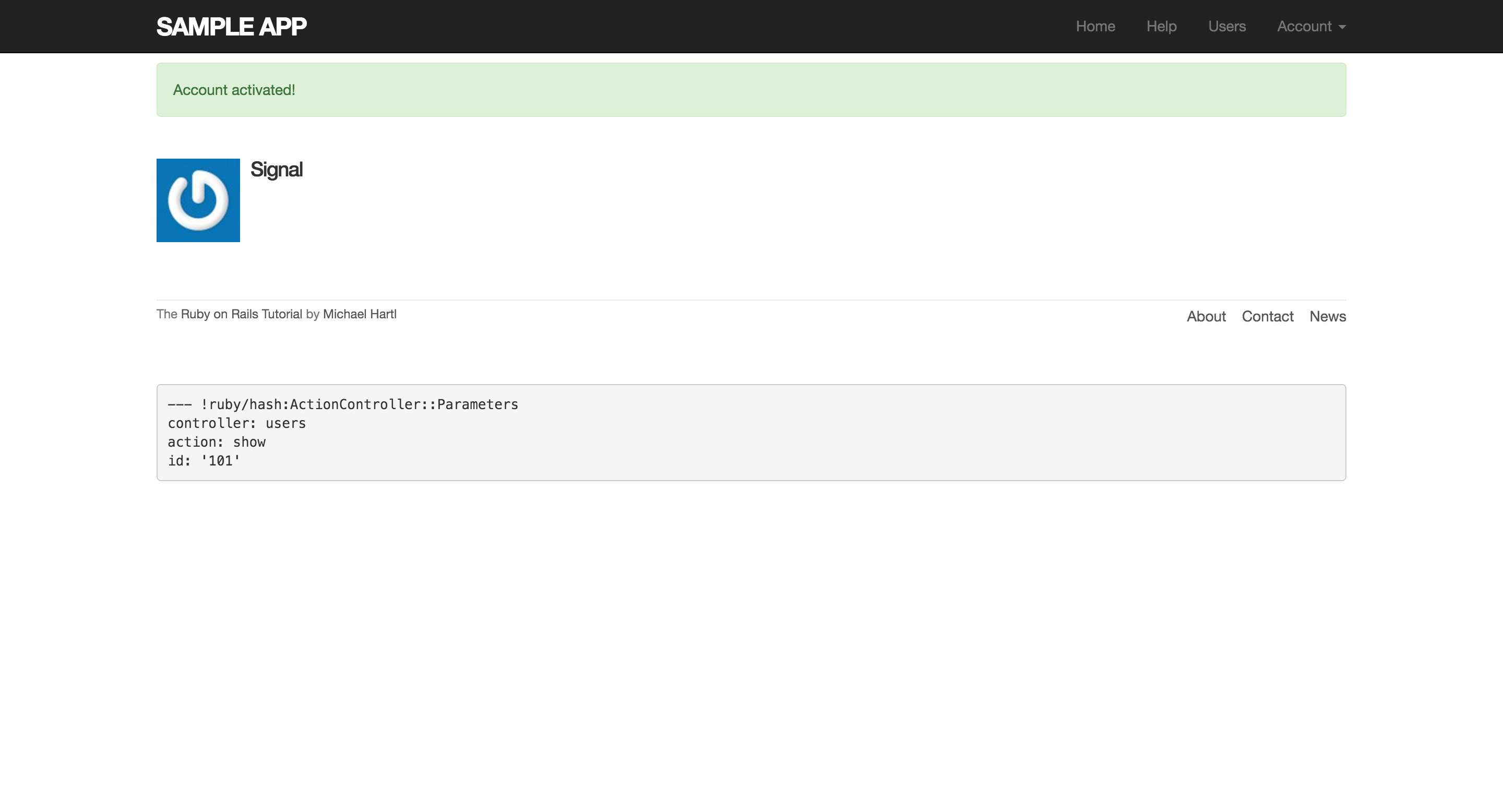
不過目前啟動使用者之後沒什麼實際的效果,因為我們還沒改變登入的方式。為了讓啟動有實質意義,要只允許已啟動的使用者才能登入,方式就是如果 user.activated? 值為 true,就允許使用者登入,反之導回首頁,並且出現警告訊息:
app/controllers/sessions_controller.rb
class SessionsController < ApplicationController

  def new
  end

  def create
    user = User.find_by(email: params[:session][:email].downcase)
    if user && user.authenticate(params[:session][:password])
      if user.activated?
        log_in user
        params[:session][:remember_me] == '1' ? remember(user) : forget(user)
        redirect_back_or user
      else
        message  = "Account not activated. "
        message += "Check your email for the activation link."
        flash[:warning] = message
        redirect_to root_url
      end
    else
      flash.now[:danger] = 'Invalid email/password combination'
      render 'new'
    end
  end

  def destroy
    log_out if logged_in?
    redirect_to root_url
  end
end
如果未啟動,想登入會得到以下畫面:
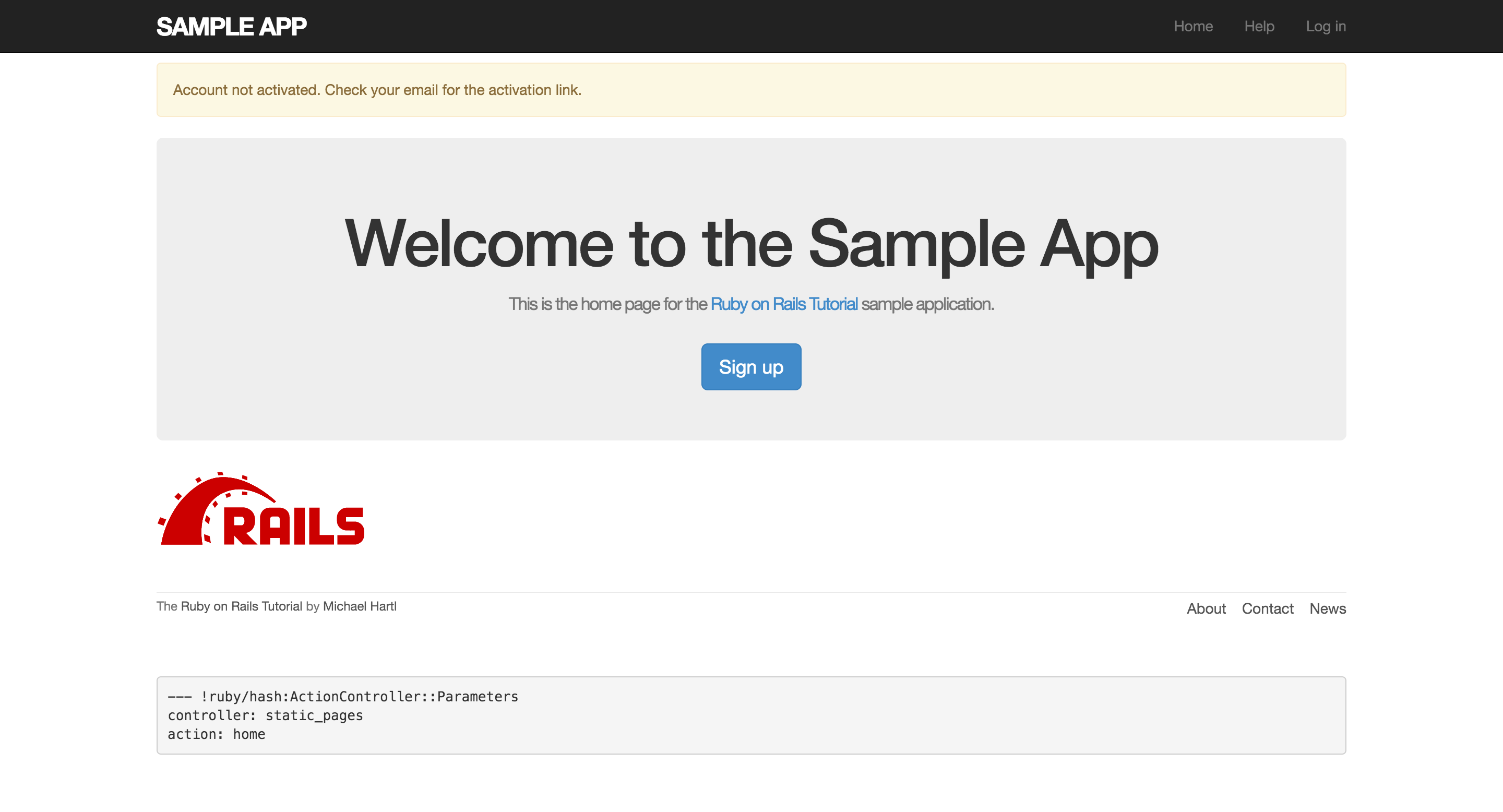
到這邊,啟動帳號就完成了,除了還有一個地方要改進,留在練習題。(不顯示未啟動的使用者)
接下來會編寫一些測試、重構,完成整個功能。