Signup error messages
現在要加入有用的錯誤訊息,說明註冊失敗的原因。Rails 基於在 User model 驗證上,提供了這樣的訊息,例如試著提供無效的 email 和密碼,然後儲存:
$ rails console
>> user = User.new(name: "Foo Bar", email: "foo@invalid",
?>                 password: "dude", password_confirmation: "dude
>> user.save
=> false
>> user.errors.full_messages
=> ["Email is invalid", "Password is too short (minimum is 6 characters)"]
errors.full_messages 物件是一個包含錯誤訊息的陣列。在上面的 console 中,當嘗試儲存錯誤資料的時候,就會產生跟 @user 物件相關的錯誤訊息。
為了在頁面上顯示錯誤訊息,可以在 new.html.erb 頁面上 render 一個 error-messages partial,同時也替每一個輸入欄位加上 CSS form-control:
app/views/users/new.html.erb
<% provide(:title, 'Sign up') %>
<h1>Sign up</h1>

<div class="row">
  <div class="col-md-6 col-md-offset-3">
    <%= form_for(@user) do |f| %>
      <%= render 'shared/error_messages' %>

      <%= f.label :name %>
      <%= f.text_field :name, class: 'form-control' %>

      <%= f.label :email %>
      <%= f.email_field :email, class: 'form-control' %>

      <%= f.label :password %>
      <%= f.password_field :password, class: 'form-control' %>

      <%= f.label :password_confirmation, "Confirmation" %>
      <%= f.password_field :password_confirmation, class: 'form-control' %>

      <%= f.submit "Create my account", class: "btn btn-primary" %>
    <% end %>
  </div>
</div>
<%= render 'shared/error_messages' %> 這段就是 render shared/error_messages 的 partical 檔案,按照 Rails 慣例,shared/ 目錄是放置可以讓好幾個 controller 的 view 共用的 partial 檔案。
所以這表示我們要建立一個 app/views/shared 目錄:
$ mkdir app/views/shared
接著建立 _error_messages.html.erb partial 檔案:
app/views/shared/_error_messages.html.erb
<% if @user.errors.any? %>
  <div id="error_explanation">
    <div class="alert alert-danger">
      The form contains <%= pluralize(@user.errors.count, "error") %>.
    </div>
    <ul>
    <% @user.errors.full_messages.each do |msg| %>
      <li><%= msg %></li>
    <% end %>
    </ul>
  </div>
<% end %>
這個 partial 檔案包含了幾個新的 Rails 和 Ruby 架構,包括 Rails error 物件的兩個方法。第一個方法是 count,回傳錯誤的數量:
> user.errors.count
=> 2
另一個方法是 any?,作用跟 empty? 相反:
> user.errors.empty?
=> false
> user.errors.any?
=> true
如果物件為空,empty? 會回傳 true,反之回傳 false。any? 則是在物件存在時,回傳 true,反之回傳 false。(count、empty?、any? 也可以用在陣列上)
另外還有 pluralize 方法,預設在 console 無法使用,但可以透過 include ActionView::Helpers::TextHelper module 來使用它:
> include ActionView::Helpers::TextHelper
> pluralize(1, "error")
=> "1 error"
> pluralize(5, "error")
=> "5 errors"
pluralize 的第一個參數是整數(integer),然後會回傳這個整數的正確單複數形,給第二個參數使用。pluralize 方法是由功能強大的 inflector 實作,可以處理大多數單字的單複數轉換,甚至包括不規則的複數形:
> pluralize(2, "woman")
=> "2 women"
> pluralize(3, "erratum")
=> "3 errata"
所以這段程式碼:
<%= pluralize(@user.errors.count, "error") %>
可以回傳 "0 errors", "1 error", "2 errors" 之類的字串,可以避免出現像 1 errors 這種錯誤。
不過其實這是針對英文,中文就沒差了,1 個「錯誤」跟 5 個「錯誤」,都一樣XDDD
接著來增加樣式。Rails 會自動把錯誤訊息包在含有 field_with_errors class 的 div 區塊裡。然後可以使用 Sass 的@extend function 把 Bootstrap 的 has-error class 引進樣式裡:
app/assets/stylesheets/custom.css.sass
.
.
.
/* forms */
.
.
.
#error_explanation
  color: red
  ul
    color: red
    margin: 0 0 30px 0

.field_with_errors
  @extend .has-error
  .form-control
    color: $state-danger-text
最後畫面會長這樣:
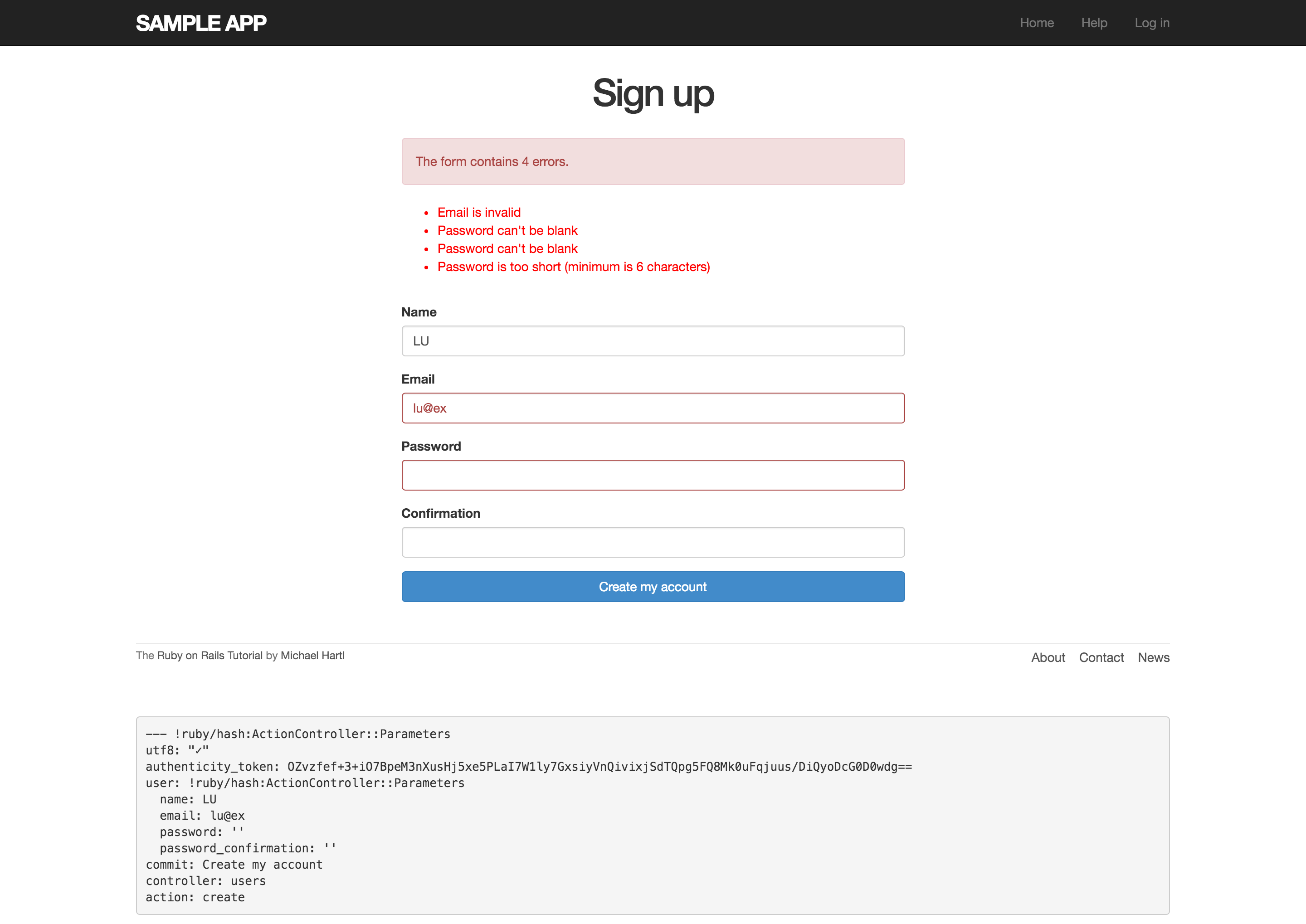
因為錯誤訊息是由 model 驗證產生的,所以之後如果修改驗證規則,錯誤訊息就會跟著改變。由於我們加了存在性驗證(presence validation),加上 has_secure_password 方法換驗證是否有沒有密碼(密碼是否為 nil),所以如果使用者沒有輸入密碼,目前會出現重複的錯誤訊息,之後會增加 allow_nil: true 方法,來解決這個問題。